

For any default Blogger layout, the "Showing posts with label" message shows up above the posts each time you click on a label link. As it's a pretty useless and annoying message, many people like to have it removed. If that is your wish, just follow the tutorial below:
Removing "Showing post with label...show all posts"
Step 1. Go to Dashboard - Template - Edit HTML (if necessary, click on Proceed button)
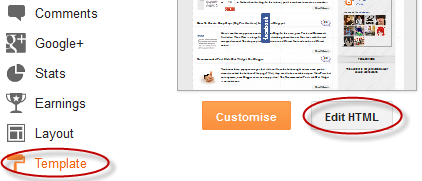
Step 2. Click anywhere inside the template code, then search - using CTRL+F - this code:
<b:includable id='status-message'>After you found it, click on the sideways arrow next to it, to expand the rest of the code.
Screenshot:

Step 3. Below is this code that you need to remove - along with the first one, as well:
<b:includable id='status-message'>
<b:if cond='data:navMessage'>
<div class='status-msg-wrap'>
<div class='status-msg-body'>
<data:navMessage/>
</div>
<div class='status-msg-border'>
<div class='status-msg-bg'>
<div class='status-msg-hidden'><data:navMessage/></div>
</div>
</div>
</div>
<div style='clear: both;'/>
</b:if>
</b:includable>
Screenshot

Step 4. Replace it with this one:
<b:includable id='status-message'>
<b:if cond='data:navMessage'>
<div>
</div>
<div style='clear: both;'/>
</b:if>
</b:includable>
Step 5. Save the template. Now view your blog and click on some label....there should be no box anymore.
 Manthan dudeja is the founder of Helplogger, He is a young Blogger ,Web Designer, Graphic Designer and owns his popularity to the fact that he posts genuine contents to his blog and believe in good rituals. He is young and truly innovative in his work At helplogger he mostly writes about How to blog tips, Tech news, Gadget Reviews etc.


0 comments:
Post a Comment