


Adding Random Posts with Thumbnails and Posts Summary on Blogger
Step 1. Login to your blogger account, select your blog and go to Layout.Step 2. Add new widget by clicking on the Add a gadget link and select Html/JavaScript from the popup window.
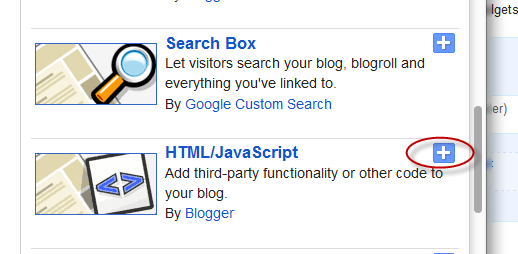
Step 3. After adding the HTML/JavaScript you need to copy the following script and paste it in the Content box.
<style>
#random-posts img {
border-radius: 10px;
float: left;
margin-right: 5px;
width: 75px;
height: 75px;
background-color: #F5F5F5;
padding: 3px;
transition: all 0.2s linear 0s;
}
#random-posts img:hover {
opacity: 0.6;
}
ul#random-posts {
list-style-type: none;
padding: 0px;
}
#random-posts a {
font-size: 12px;
text-transform: uppercase;
padding: 0px auto 5px;
}
#random-posts a:hover {
text-decoration: none;
}
.random-summary {
font-size: 11px;
background: none;
padding: 5px;
margin-right: 8px;
}
#random-posts li {
margin-bottom: 10px;
border-bottom: 1px solid #EEEEEE;
padding: 4px;
}
</style>
<ul id='random-posts'>
<script type='text/javaScript'>
var randomposts_number = 5;
var randomposts_chars = 110;
var randomposts_details = 'yes';
var randomposts_comments = 'Comments';
var randomposts_commentsd = 'Comments Disabled';
var randomposts_current = [];
var total_randomposts = 0;
var randomposts_current = new Array(randomposts_number);
function randomposts(json) {
total_randomposts = json.feed.openSearch$totalResults.$t
}
document.write('<script type=\"text/javascript\" src=\"/feeds/posts/default?alt=json-in-script&max-results=0&callback=randomposts\"><\/script>');
function getvalue() {
for (var i = 0; i < randomposts_number; i++) {
var found = false;
var rndValue = get_random();
for (var j = 0; j < randomposts_current.length; j++) {
if (randomposts_current[j] == rndValue) {
found = true;
break
}
};
if (found) {
i--
} else {
randomposts_current[i] = rndValue
}
}
};
function get_random() {
var ranNum = 1 + Math.round(Math.random() * (total_randomposts - 1));
return ranNum
};
</script>
<script type='text/javaScript'>
function random_posts(json) {
for (var i = 0; i < randomposts_number; i++) {
var entry = json.feed.entry[i];
var randompoststitle = entry.title.$t;
if ('content' in entry) {
var randompostsnippet = entry.content.$t
} else {
if ('summary' in entry) {
var randompostsnippet = entry.summary.$t
} else {
var randompostsnippet = "";
}
};
randompostsnippet = randompostsnippet.replace(/<[^>]*>/g, "");
if (randompostsnippet.length < randomposts_chars) {
var randomposts_snippet = randompostsnippet
} else {
randompostsnippet = randompostsnippet.substring(0, randomposts_chars);
var whitespace = randompostsnippet.lastIndexOf(" ");
randomposts_snippet = randompostsnippet.substring(0, whitespace) + "…";
};
for (var j = 0; j < entry.link.length; j++) {
if ('thr$total' in entry) {
var randomposts_commentsnum = entry.thr$total.$t + ' ' + randomposts_comments
} else {
randomposts_commentsnum = randomposts_commentsd
}; if (entry.link[j].rel == 'alternate') {
var randompostsurl = entry.link[j].href;
var randomposts_date = entry.published.$t;
if ('media$thumbnail' in entry) {
var randompoststhumb = entry.media$thumbnail.url
} else {
randompoststhumb = "https://blogger.googleusercontent.com/img/b/R29vZ2xl/AVvXsEgb9EZ15i5Wozb2r_LYLmAwlh7Mzu6UMPCtXAUnwrpgLGi6TWW2UdcjvTVA8xSMJ7PAanm8x_rnRSuWRpb2H__Rz1hEY77hZUz8gCei2qEiaeHoX7L48ewAUoV3aNf4JGPfZXjHhxaK6Sg/s1600/no_thumb.png"
}
}
};
document.write('<li>');
document.write('<a href="' + randompostsurl + '" rel="nofollow"><img alt="' + randompoststitle + '" src="' + randompoststhumb + '"/></a>');
document.write('<div><a href="' + randompostsurl + '" rel="nofollow">' + randompoststitle + '</a></div>');
if (randomposts_details == 'yes') {
document.write('<span><div class="random-info">' + randomposts_date.substring(8, 10) + '.' + randomposts_date.substring(5, 7) + '.' + randomposts_date.substring(0, 4) + ' - ' + randomposts_commentsnum) + '</div></span>'
};
document.write('<br/><div class="random-summary">' + randomposts_snippet + '</div><div style="clear:both"></div></li>')
}
};
getvalue();
for (var i = 0; i < randomposts_number; i++) {
document.write('<script type=\"text/javascript\" src=\"/feeds/posts/default?alt=json-in-script&start-index=' + randomposts_current[i] + '&max-results=1&callback=random_posts\"><\/script>')
};
</script>
</ul>
Random Posts Options
- Thumbnail dimensions: to change the size of the thumbnails in pixels, replace the 75px value.- Summary length: you can control the the length of the summary (in characters) by changing the 110 value from var randomposts_chars=110;
- Post info: if you want to hide the post date and comment count change 'yes' from var randomposts_details='yes'; to 'no';
- Font Size for Posts Titles and Summary: to modify the font size for the post snippet modify the 11px value and for the posts title, the 12px value;
Click on the Save button and View your blog. The sidebar will display a random posts widget on each of your blog pages.
 Manthan dudeja is the founder of Helplogger, He is a young Blogger ,Web Designer, Graphic Designer and owns his popularity to the fact that he posts genuine contents to his blog and believe in good rituals. He is young and truly innovative in his work At helplogger he mostly writes about How to blog tips, Tech news, Gadget Reviews etc.


0 comments:
Post a Comment