

How to highlight author comments in Blogger:
Step 1. Go to Template, click on Edit HTML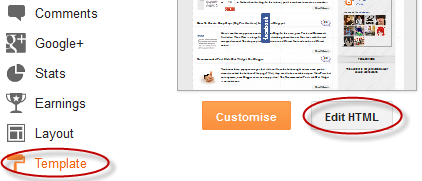
Step 2. Click anywhere inside the code area and try to find - using CTRL + F keys - this tag:
</body>
Screenshot:

Step 3. Just above it, paste the following code:
<script src='http://code.jquery.com/jquery-latest.js'/>
<script>
$(function() {
function highlight(){
$('.user.blog-author').closest('.comment-block')
.css('border', '1px solid #FFA500')
.css('background','#F1F1F2 url("http://www.blogblog.com/1kt/transparent/white80.png")')
.css('color', '#444444')
.css('font-size', '12px')
.css('padding', '10px');
}
$(document).bind('ready scroll click', highlight);
});
</script>
Customizing the Author Comments:
Border:
The line marked in orange represents the border's style.
What it can be done:
- 1px - you can increase the value to change the border's thickness
- solid - change the border's style to dotted, dashed, inset, outset etc.
- #FFA500 - this is the border's color value, change it with your own color
The line marked in blue represents the background's style. You can use a plain color or an image. By default there's a combination of both (a white transparent image with a gray plain color).
To change/add:
- a different color: replace the #F1F1F2 value with your own (use this tool to find the hex code of your desired color)
- an image: replace the defaul url http://www.blogblog.com/1kt/transparent/white80.png with that of your image
Font Color:
To change the font's color, replace the #444444 color value in green with your own. (you can use this tool to find the hex code of your desired color)
Font Size:
Modify the value in red by increasing/decreasing the "12" value in order to change the size of text.
Step 4. Now Save your Template.
To customize the entire style of threaded comments, please check my previous tutorial on How to Customize Comment's Background, Font Color and Border in Blogger.
 Manthan dudeja is the founder of Helplogger, He is a young Blogger ,Web Designer, Graphic Designer and owns his popularity to the fact that he posts genuine contents to his blog and believe in good rituals. He is young and truly innovative in his work At helplogger he mostly writes about How to blog tips, Tech news, Gadget Reviews etc.


0 comments:
Post a Comment